
How does Vimora Care work?
On the platform, caregivers and families can connect directly through simple registration and quick contact options.
Vimora Care is an online platform where caregivers and families can find each other.
Add your details and appear on the website, or unlock users’ contact details.
Create your account in just a few minutes.
1. Registration
First, create your account on the registration page.
2. Complete your profile

Add the important details so others can get a clear picture of you.
3. Activate your profile
A visible profile gives you a better chance of being chosen directly by families, without an agency.
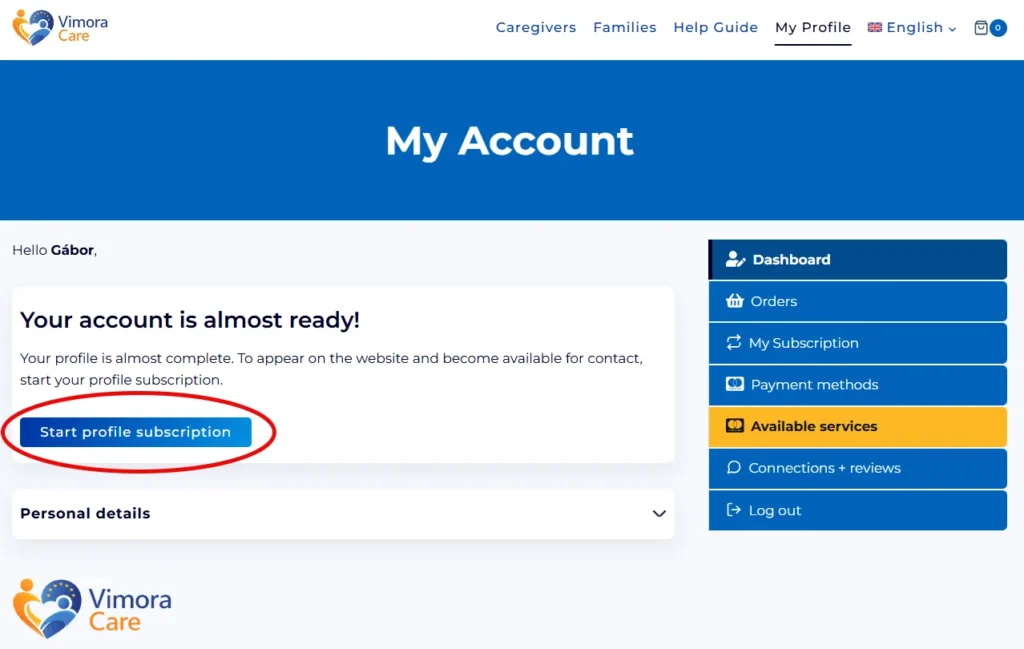
After completing your profile form, you can start the profile subscription process.
Click the Start profile subscription button, or open Available services on the My Account page and choose the Profile Visibility subscription.
You can then complete the subscription on the checkout page. The first 60 days are completely free, then it is 5 € / month.
4. Contact unlock
If your profile is active and visible on the website, users can request your contact details directly, and we will also notify you by email.
Contact unlock allows you to get in touch directly with a caregiver or a family. The process is quick, simple, and can be started in just a few steps.
1. Choose a profile
Visit the profile of the caregiver or family you would like to contact. The profile helps you review the most important information before making a decision.
2. Click the contact button

If you would like to request the contact details of a caregiver or family, click the contact button shown at the bottom of the image.
3. Start the contact unlock
If you already have a purchased contact unlock available, the process starts with a single click.
If you do not have an available contact unlock yet, you first need to purchase this option.
4. You receive the contact details immediately
After a successful contact unlock, the other party’s email address and phone number will appear immediately.
We also send the details to both parties by email.
After the contact unlock, the other party’s profile is automatically moved to paused status (becomes inactive) to prevent a competitive situation from developing.
Profile Boost helps your profile appear in a more visible position on listing pages. This gives you a better chance of being found by people looking for a caregiver or a family.
1. Make sure your profile is active
Profile Boost can only be used if your profile is already active and visible on Vimora Care. First, you need a live, visible profile.
2. Start it from your profile
You can find the Profile Boost option on your profile page under “Available services”. Here, you can choose the package that suits you best.
3. More views = more opportunities
After a successful purchase, your profile automatically appears higher in the search results. This can help more people open your profile and find you more easily.
4. Profile Boost is valid for a fixed period
Profile Boost is always valid for the period you purchased. If you would like to keep your profile in a more visible position, you can purchase it again after the period expires.
Speed Email helps you quickly receive notifications about new profiles that appear in the areas important to you. This allows you to respond sooner and increases your chances of finding the right connection.
1. Purchase the Speed Email service
You can find the service on your profile page under “Available services”. Here, you can purchase the Speed Email option.
2. Area-based notifications
To use Speed Email, your profile needs to be completed and your profile visibility must be active. Choose the area where you are looking for a partner, because the system will only send notifications about new users who appear in the location you have selected.
3. You receive notifications about new profiles
When a new relevant user appears in your selected areas, the system sends you an email notification. This helps you be among the first to learn about new opportunities.
4. Faster response = more opportunities
The benefit of Speed Email is that you do not need to constantly monitor new users yourself. With notifications, you can respond faster to new profiles and more easily find the right person for you.
You can manage your active services in your account at any time.
Here you can view:Paused profile status means that the profile is temporarily inactive and does not appear as active in the search results. Users can manage their profile visibility in their account at any time.
After a contact unlock, the profile of the user who was contacted is automatically moved to paused profile status. This helps both parties communicate calmly and prevents a competitive situation from developing.